NetBlade
iPhone · iPad

iPhone and iPad · iOS 17 and later

Your network in your hand, SNMP at the core.

NetBlade for iPhone and iPad finds the devices on your network, queries routers and switches over SNMP and puts a network toolbox in your pocket. iOS keeps the neighbours' MAC addresses from apps, so NetBlade asks the router for them, and SNMP is free. No ads, and every saved network keeps a timeline of what changed.

Price
Freeno ads

NetBlade Pro 1.99 USD per month or 8.99 USD per year

3-day trial for eligible accounts

For iPhone and iPadApp Store In Apple review
NetBlade iPhone · iPad — LAN: who is on the network NetBlade iPhone · iPad — Ports: service, description and risk

Who it is for

Whoever looks after the home network

See every device with its vendor and open ports, save the network, and find out what changed since the last time you opened the app.

The IT consultant with an iPhone in their pocket

Query a client's switch over SNMP, check a host's ports, open an SSH session or read a Windows PC's inventory without going back to the car for the laptop.

The small office running on Apple devices

An iPad at the front desk is enough to see who is on the network, whether the router answers on factory settings and which PC is missing its defences.

Screen by screen

A tour of the app

Real screens from the app, tab by tab.

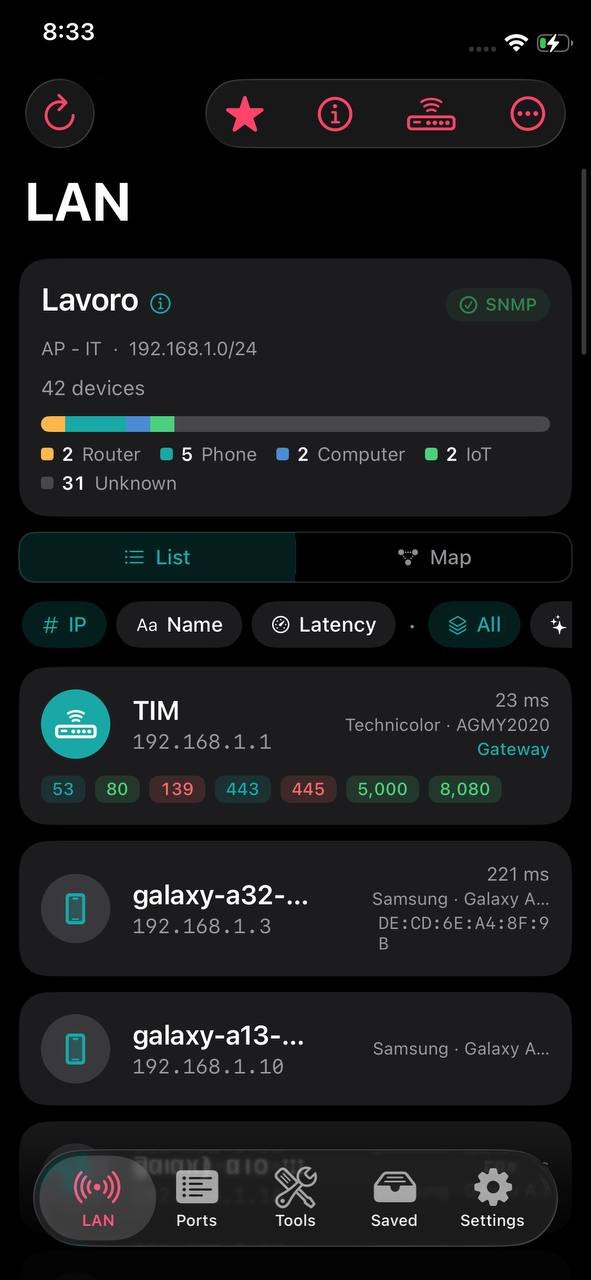
NetBlade iPhone · iPad — LAN: who is on the network
01

LAN: who is on the network

The saved network's name at the top, with SSID, subnet, the device count and a bar showing the mix of routers, phones, computers and IoT devices. The green SNMP chip means the router answered, so each device comes with vendor, model and MAC, plus its open ports as coloured pills.

  • The first scan starts by itself when you open the tab
  • Sort by IP, name or latency; filter all, new or with open ports
  • Switch between the list and the network map
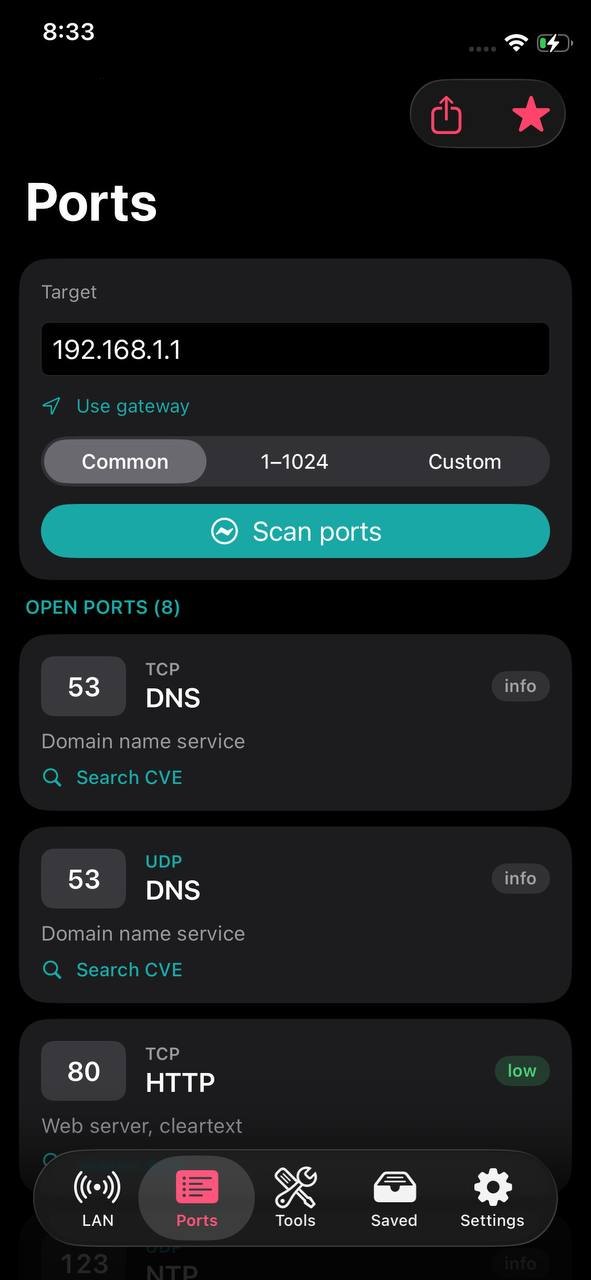
NetBlade iPhone · iPad — Ports: service, description and risk
02

Ports: service, description and risk

Type a target or use the gateway, choose common ports, 1–1024 or your own list, and read each open port with its service, a short description and a risk level. TCP and UDP results sit side by side.

  • Real UDP probes for DNS, NTP, TFTP, mDNS, NetBIOS and SNMP
  • «Search CVE» next to each port opens the National Vulnerability Database
  • Share the result from the top bar
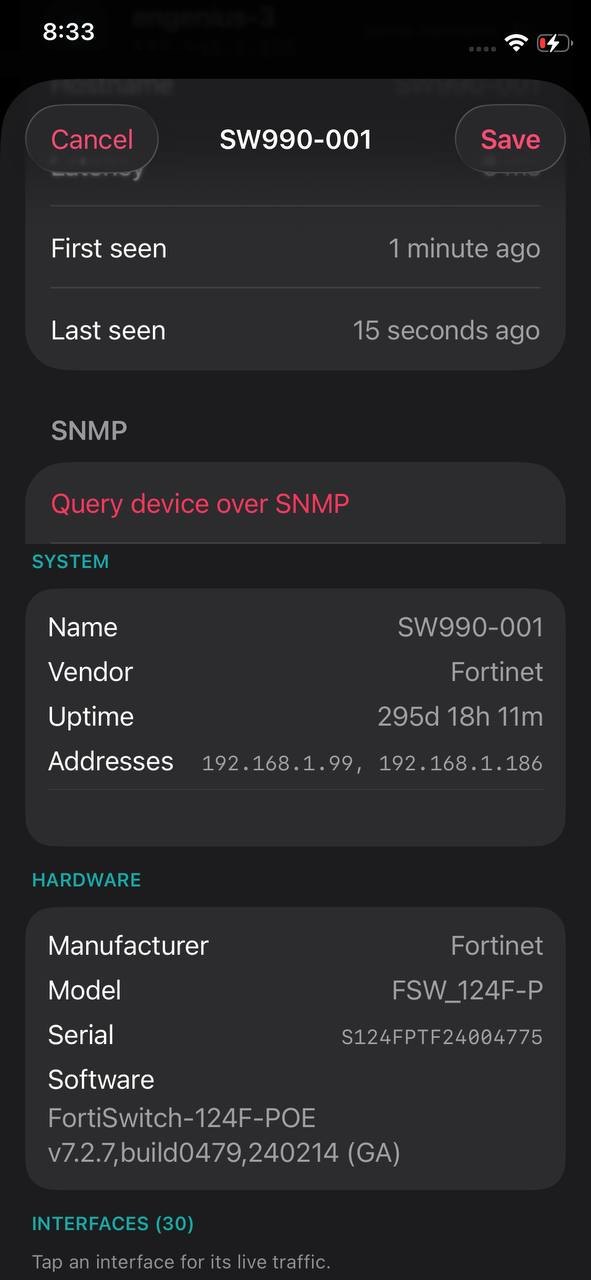
NetBlade iPhone · iPad — SNMP: what a switch says about itself
03

SNMP: what a switch says about itself

Query a device over SNMP and read its name, vendor, uptime and addresses, then manufacturer, model, serial number and firmware. The interfaces follow, and tapping one shows its live traffic.

  • v1, v2c and v3, free on iPhone
  • Also VLANs, storage, CPU, and toner and pages on printers
  • Read-only: nothing is changed on the device
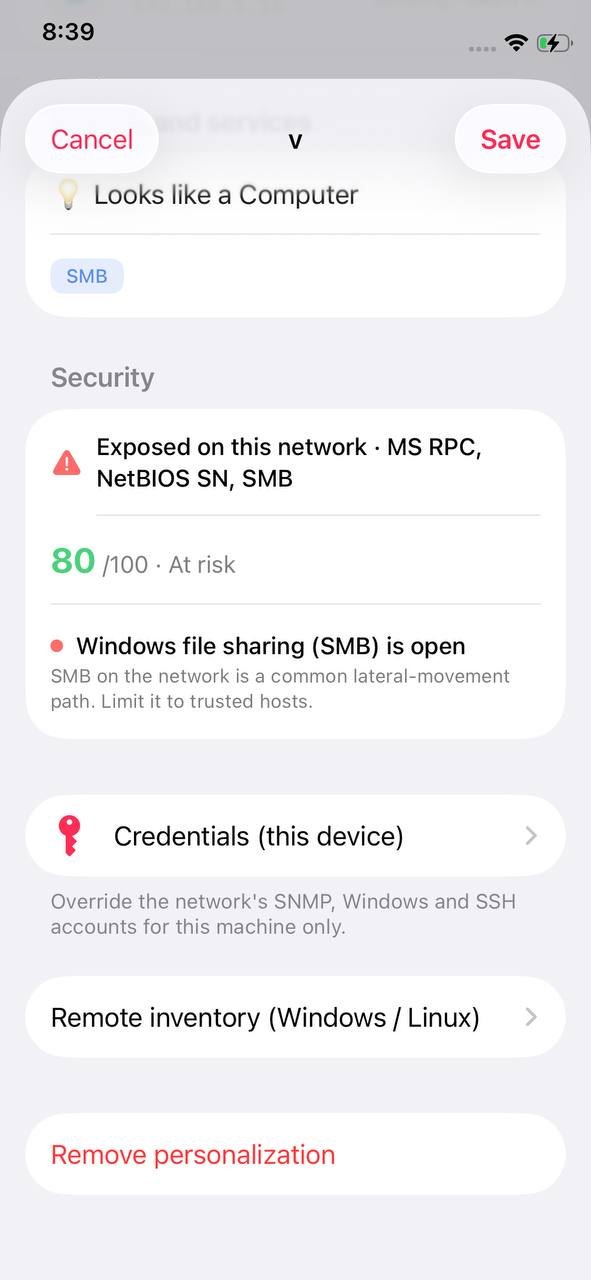
NetBlade iPhone · iPad — Device details: security, credentials, inventory
04

Device details: security, credentials, inventory

The services a device announces, with a guess at what it is, then a security score out of 100 from its open ports, with advice for each finding. From the same page you set credentials for this machine only and open the remote inventory of a Windows or Linux PC.

  • «Ask this device» queries NetBIOS, the web server and the ping TTL
  • Names, tags, notes and icons you set; «Remove personalization» goes back to the scan
  • Windows and Linux inventory with NetBlade Pro
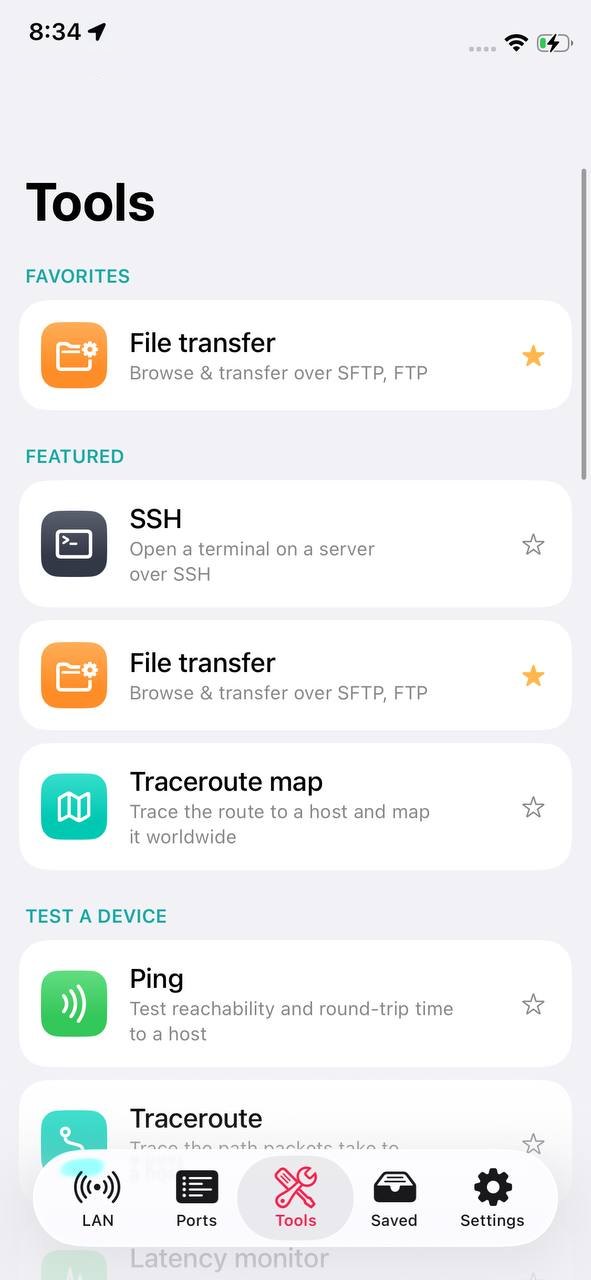
NetBlade iPhone · iPad — Tools: grouped by the job
05

Tools: grouped by the job

SSH, file transfer and the traceroute map up front, then groups to test a device, check security, inspect a domain, work on the local network and router, and more. Tap a tool's star to keep it in Favorites at the top.

  • SSH terminal with saved hosts and read-only command shortcuts
  • SFTP, FTP and FTPS file transfer, both ways
  • Traceroute with every public hop pinned on a world map
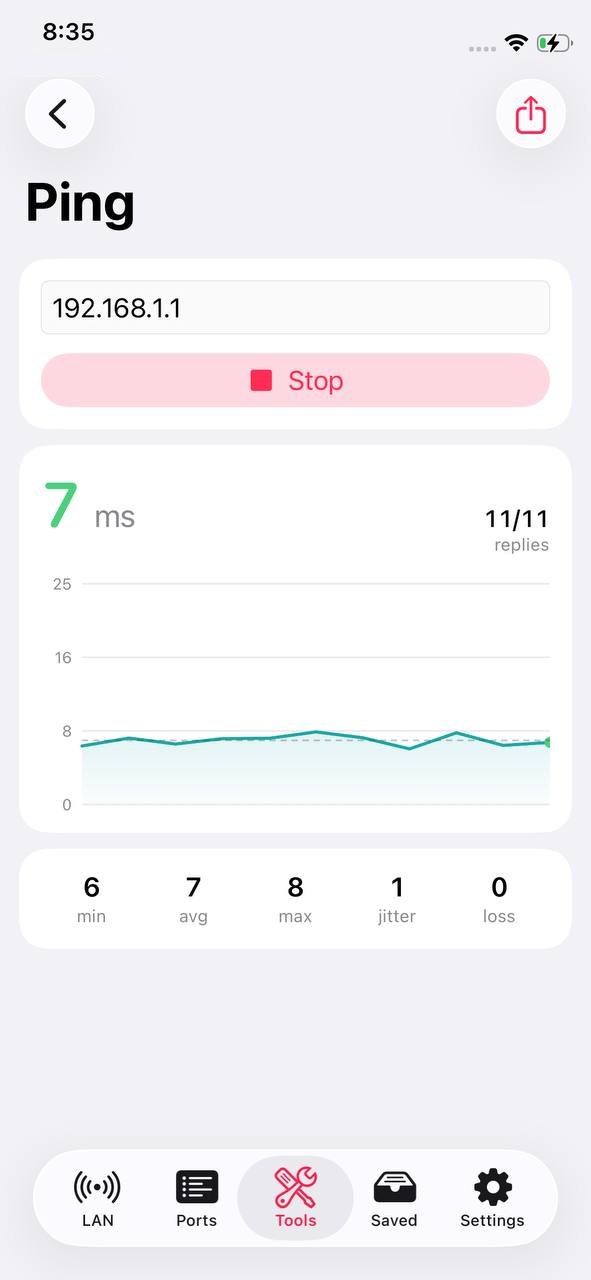
NetBlade iPhone · iPad — Ping: a chart, not just a number
06

Ping: a chart, not just a number

Ping a host until you stop it and watch every reply on a chart, with the count of replies received and minimum, average, maximum, jitter and loss below.

  • Share the result with the chart as an image
  • The latency monitor adds one ping a second with the last 60 samples
  • Traceroute, DNS, WHOIS and TLS certificate sit in the same tab

What it does not do

  • No Wi‑Fi analyzer: iOS gives apps no way to scan nearby access points.
  • No background monitoring or alerts: iOS decides by itself when to wake an app. The timeline of each saved network answers the same question when you open the app.
  • Without SNMP on the router or switches, MAC addresses and vendors are not visible: iOS closes the neighbour table to apps.
  • Windows inventory goes through WinRM only, because iOS has no SMB client: no shared folders or profiles, and versions come from the registry.
  • The SSH terminal runs one command at a time: full-screen programs such as top or vi do not work.

Questions about NetBlade for iPhone and iPad

Can I download it today?

NetBlade for iPhone and iPad is in Apple review: it will be on the App Store once approved. It is one app for both iPhone and iPad and needs iOS 17 or later.

What is free, and what is in NetBlade Pro?

Free, with no ads: LAN scan and map, device details, ports, SNMP, ping, traceroute, DNS, WHOIS, speed test, network score, one saved network with its timeline and more. NetBlade Pro adds Windows and Linux inventory, the vulnerability check, SSH and file transfer, exports and PDF reports, unlimited saved networks, backup and a few security tools.

Why does SNMP matter so much on iPhone?

Because iOS lets no app read the MAC addresses of its neighbours. NetBlade asks the router or switches for them over SNMP, which is why SNMP is free here: without it there would be no vendors and no map.

Why is there no Wi‑Fi analyzer, and no alerts?

iOS offers no API to scan nearby access points, and it decides by itself when a background app may run, without saying whether it did. Rather than a notification that may arrive hours late, each saved network keeps a timeline of what changed, ready when you open the app.

Does my network data go anywhere?

No. Scans, devices and timeline stay on the device, and passwords and SNMP credentials sit in the iOS Keychain. There are no ads, no analytics and no server of ours; outside services are contacted only when you use a feature that needs them.

Does my subscription work on Android or Windows?

No. The three NetBlade apps are independent products: they do not sync and share no data, and each purchase is valid only on its own store. NetBlade Pro on the App Store unlocks the iPhone and iPad app only.

Your network in your hand, SNMP at the core.

For iPhone and iPadApp Store In Apple review
Step-by-step setup guides →