NetBlade
Windows

Windows 10 and 11 · Network inventory and asset management

Every office you look after, on one PC.

NetBlade for Windows is an entry-level network inventory and asset-management tool for IT consultants and small offices. It finds every device, reads Windows PCs, Linux servers and network gear with your credentials, installs nothing on them, and tells you what to fix first. Then it writes the report for the owner, with your logo on it.

Price
49.99 €per year

or 6.99 € per month, or the equivalent in your currency

7-day free trial the first time, through the Microsoft Store

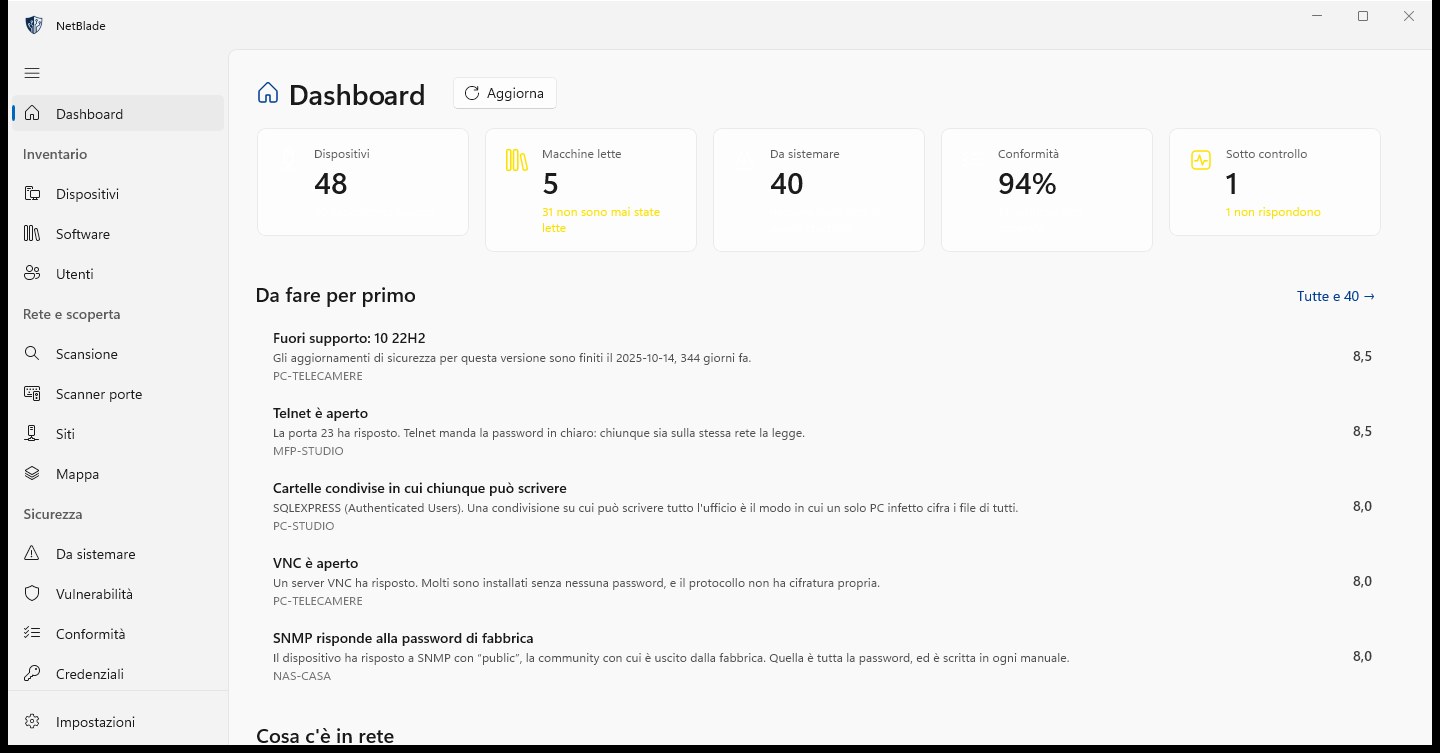
NetBlade Windows — Dashboard: the state of your networks on one page

Who it is for

The IT consultant with many clients

Each network you scan becomes a site, recognised by its gateway, so you can name it after the client. Every client gets their own devices, history, credentials and reports, and you check the security of each one against the same 17 rules.

The small office without an IT department

The practice, the shop, the office of ten people. You get the list of what is plugged in, which PCs have no antivirus or have stopped updating, and what to do first, in plain words.

The person who keeps the asset register

Name, type, labels, notes and your own fields (asset number, floor, contract) belong to you: no scan overwrites them. Model, serial number, programs and disks come from the machines themselves, and they are exported to CSV or PDF.

Screen by screen

A tour of the app

Real screens from the app, following the menu. The screenshots are in Italian; the app speaks the same twelve languages as this site.

NetBlade Windows — Dashboard: the state of your networks on one page
01

Dashboard: the state of your networks on one page

Tiles at the top count the devices, the machines read in depth, the things to fix, compliance and the watched targets. Below them, «Worth doing first» lists the most urgent problems with a score and the device each one is on: an operating system out of support, Telnet open, a share everyone can write to, SNMP still on its factory community.

  • A coverage line says how many machines were never read, because an unread device cannot report a problem
  • «The last seven days»: new devices, ports newly open, programs changed, defences switched off
  • The agent's last run and the age of the vulnerability feed, so a quiet week and an unwatched week look different
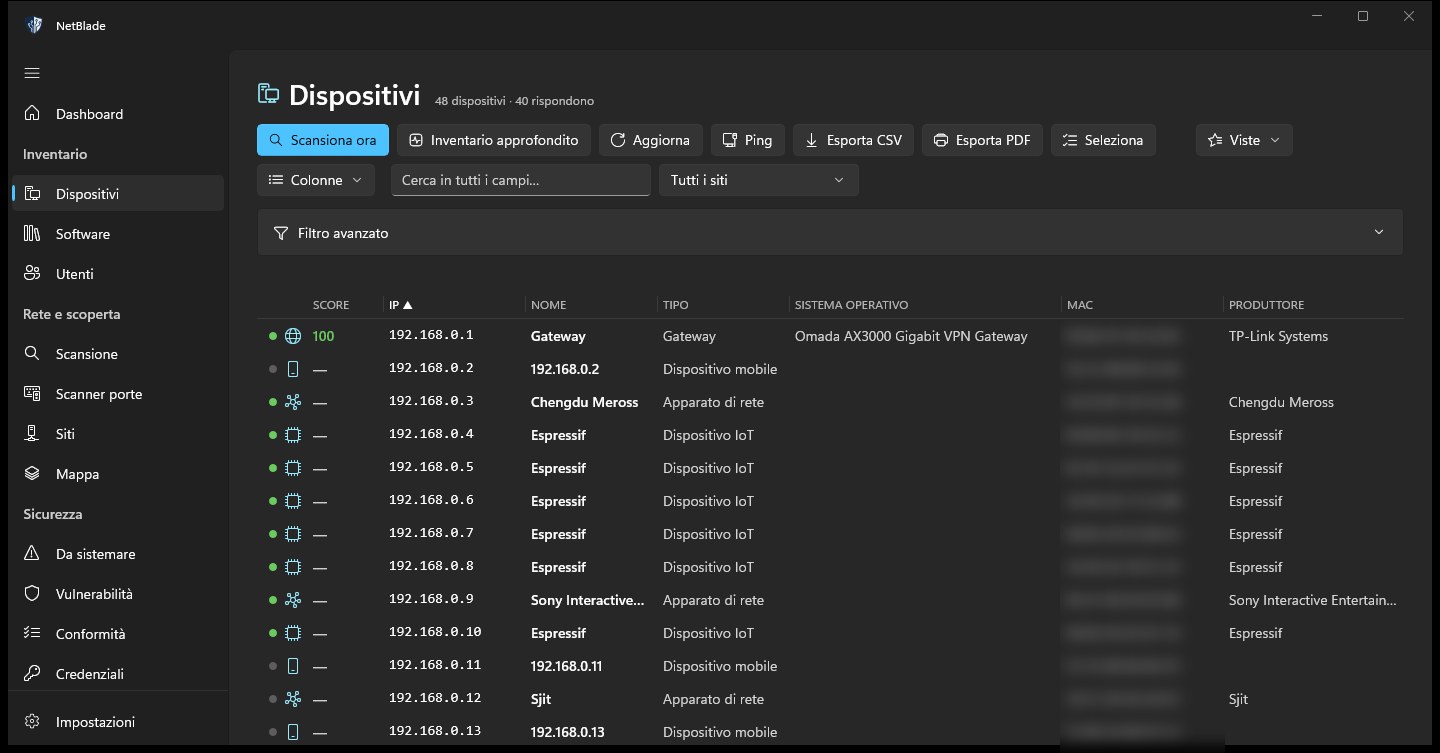
NetBlade Windows — Devices: the inventory, as a table
02

Devices: the inventory, as a table

Every device ever seen, with security score, IP, name, type, operating system, MAC and manufacturer. You sort by clicking a header, choose the columns, search every field and filter by site; «Deep inventory», «Ping», «Export CSV» and «Export PDF» sit in the toolbar.

  • Advanced filter with combined conditions, kept as saved views
  • Mass edit on many rows at once: type, notes, a tag, muted alerts, a custom field
  • Duplicates with the same MAC merge by themselves after every scan
NetBlade Windows — Vulnerabilities: which update closes what
03

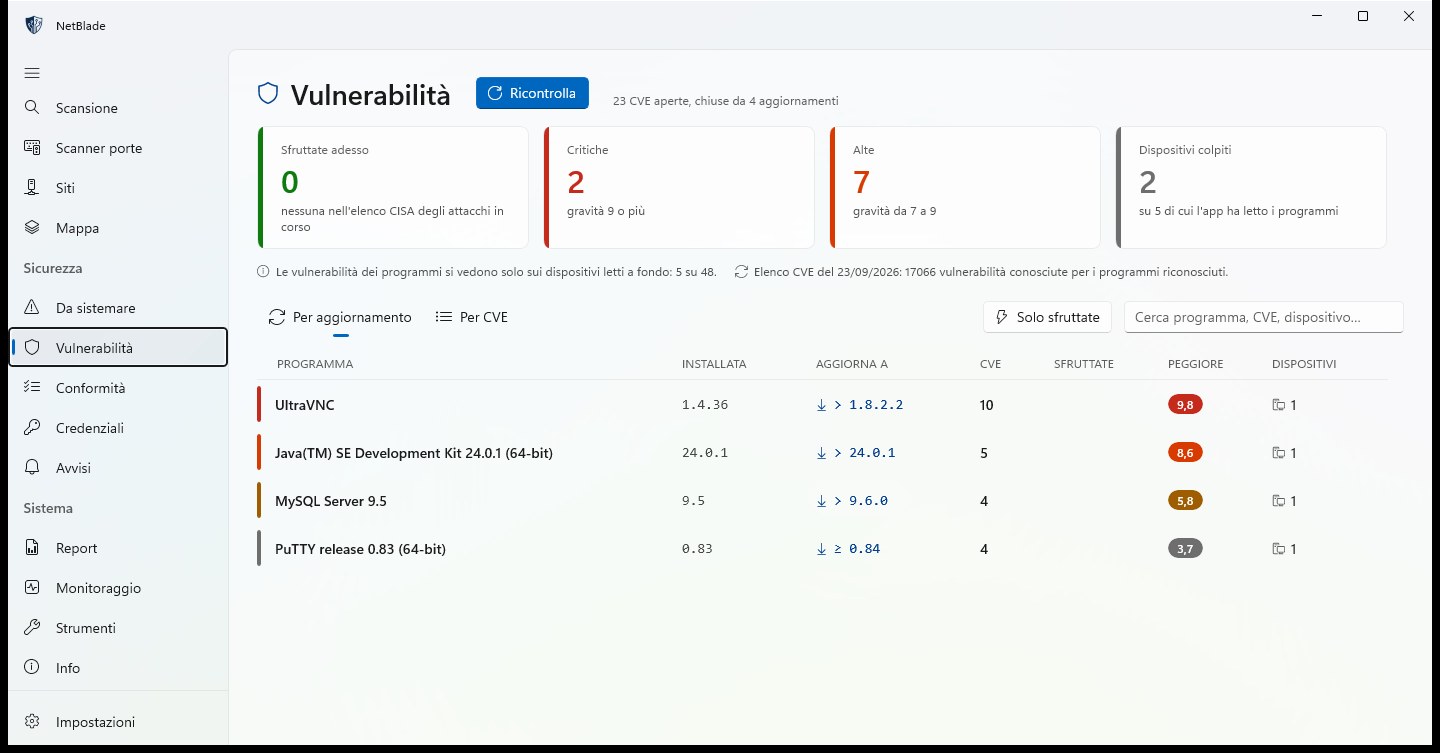
Vulnerabilities: which update closes what

Known CVEs of installed programs, matched by exact version. The «By update» view lists each program with its installed version, the version to update to, how many CVEs that closes and the worst score; the tiles count what is exploited now, critical and high flaws, and the devices affected.

  • What is on CISA's list of vulnerabilities exploited right now comes first
  • The page says on how many devices programs were read: silence is not safety
  • Compared on the PC against a signed feed: program names and versions never leave it
NetBlade Windows — Compliance: 17 baseline rules, device by device
04

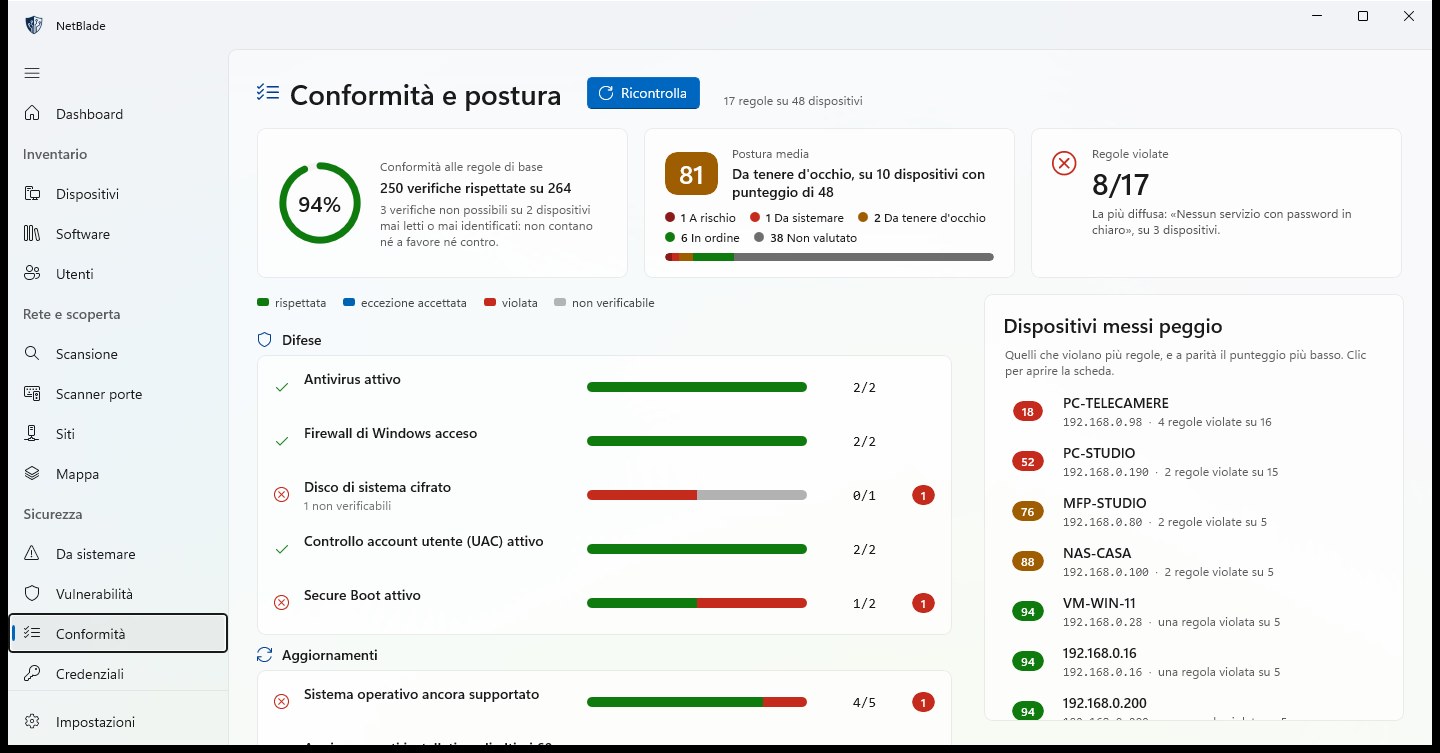
Compliance: 17 baseline rules, device by device

Antivirus on, firewall on, system drive encrypted, UAC, Secure Boot, a supported operating system, recent updates and ten more rules, grouped into Defences, Updates, Access and Network, with CIS Controls v8 IG1 as the reference. You see the share of checks kept, the average posture, the rules broken and the devices in the worst shape.

  • Each rule shows kept, broken, accepted exception or not checkable
  • Devices that cannot be checked count neither for nor against
  • Accepted risks go on record as exceptions and appear in the compliance report
NetBlade Windows — Map: how the network is really wired
05

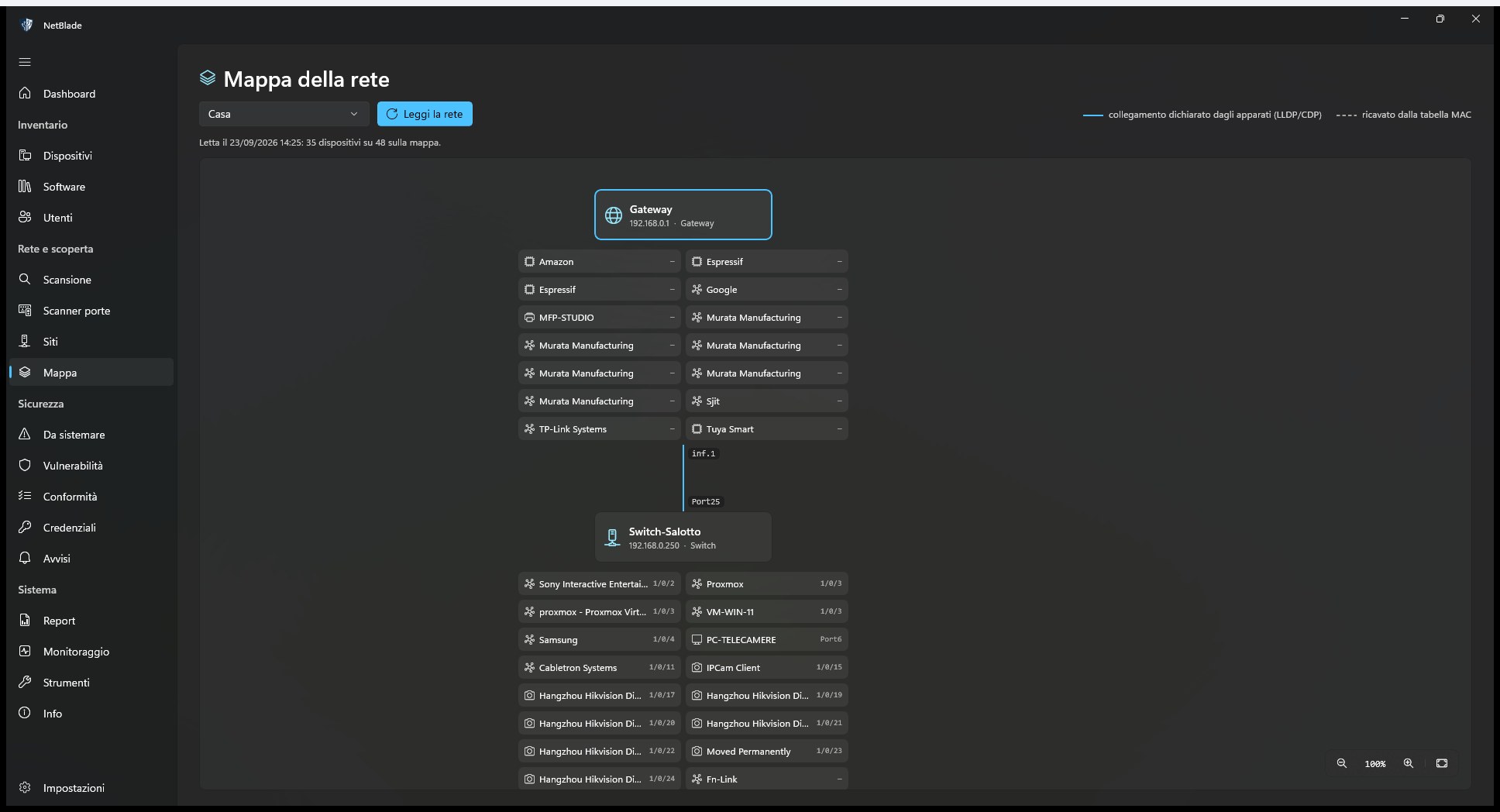
Map: how the network is really wired

NetBlade asks switches, routers and access points over SNMP what is connected to which port, and draws the result: the gateway, the switch behind it and every device on its port. The legend tells a link stated by the devices (LLDP, CDP) apart from one worked out from the MAC table.

  • One map per site, read again with «Read the network»
  • Click a node to open the device card
  • It says how many devices it could place on the map, and lists those it could not
NetBlade Windows — Port scanner: TCP, UDP and a score that says why
06

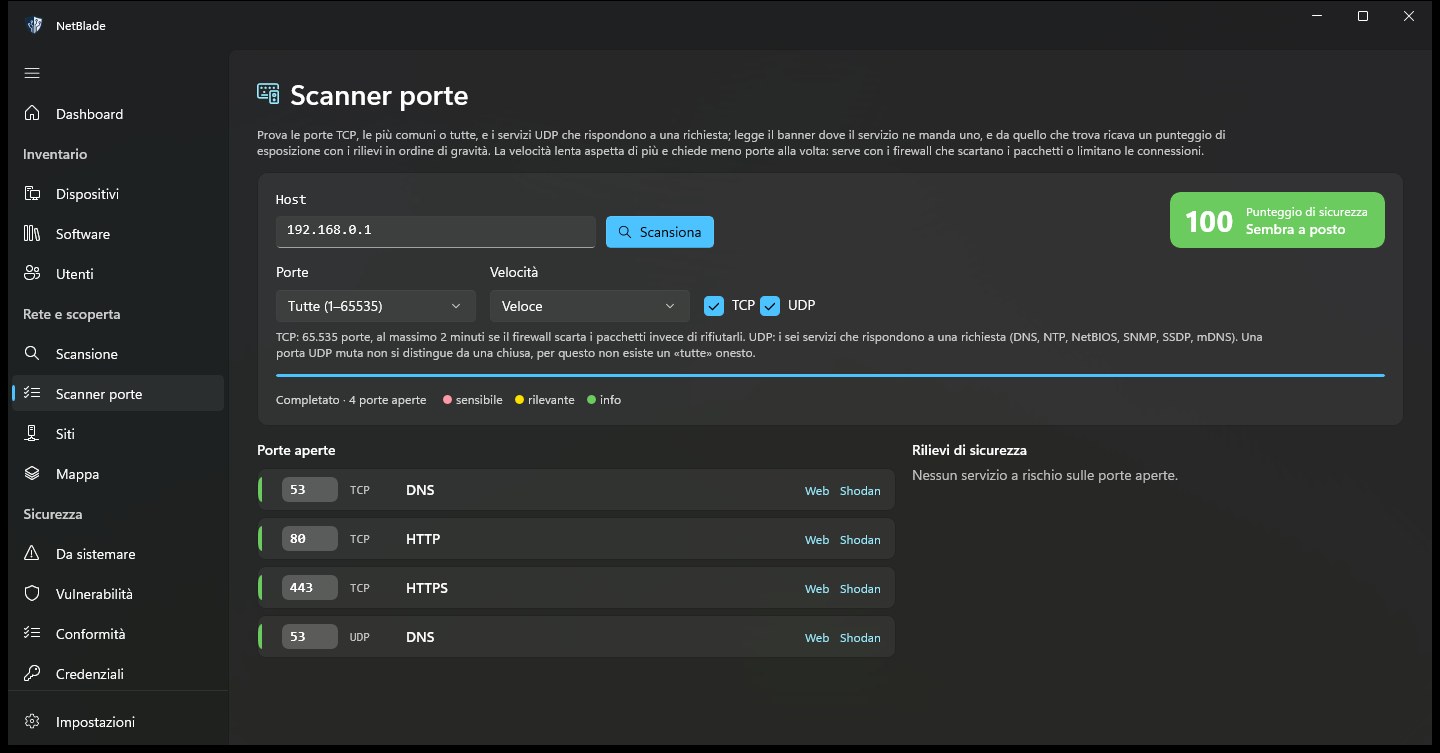
Port scanner: TCP, UDP and a score that says why

Type a host and scan the 118 most common TCP ports or all 65,535, plus the six UDP services that answer a request. Each open port comes with its service and a risk colour, and the scan ends with a security score and the findings in order of severity.

  • «Slow, more accurate» mode for firewalls that drop packets instead of refusing them
  • Banners read where the service sends one
  • Links to open a web port or look the address up on Shodan
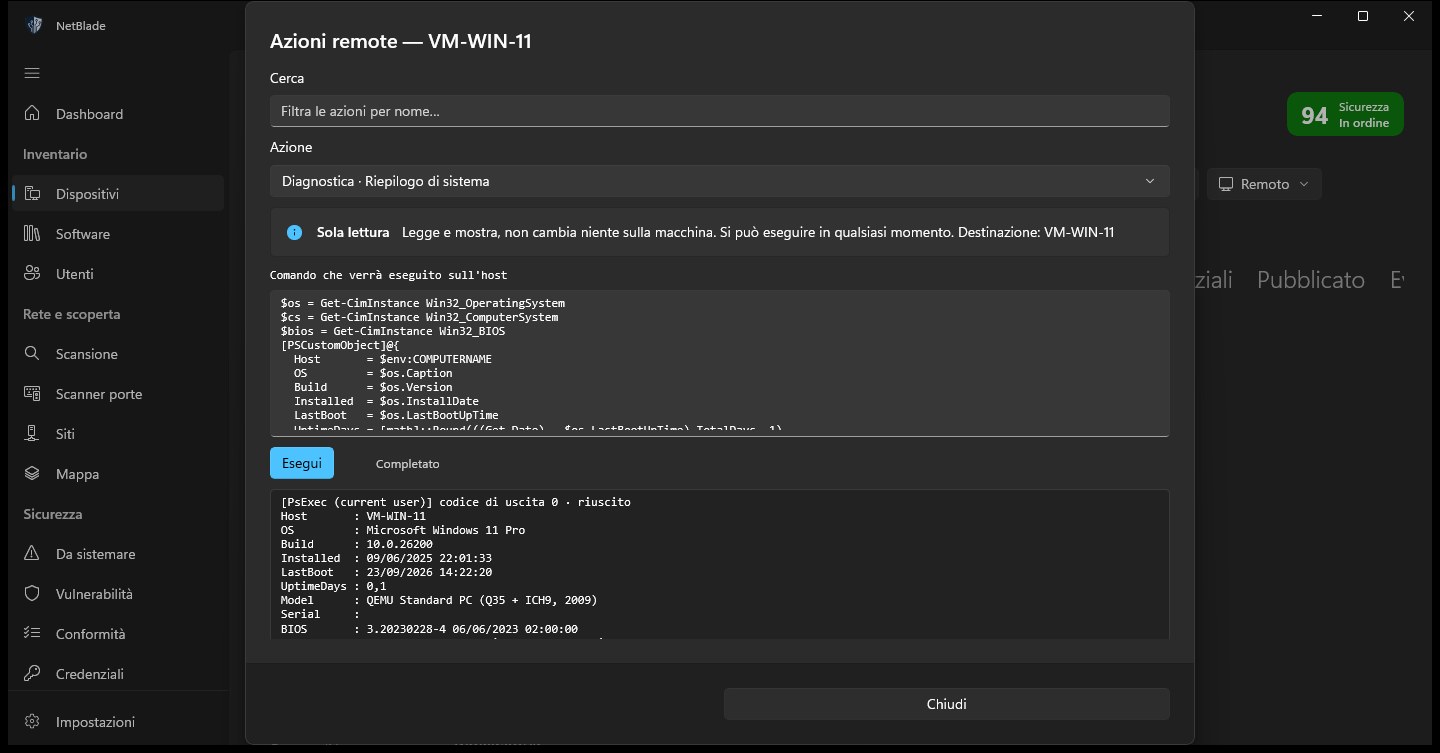
NetBlade Windows — Remote actions: about 150, with the command in plain sight
07

Remote actions: about 150, with the command in plain sight

Pick an action from a searchable catalog (diagnostics, network, firewall, services, software through winget, local accounts, Defender, BitLocker, restart and more) and read the exact PowerShell script before it runs. The output comes back in the same window.

  • Each action is marked as read-only, changing a setting or critical
  • Critical actions need an explicit confirmation, after a preview of the command
  • Runs over WinRM or PsExec, with a Windows administrator credential
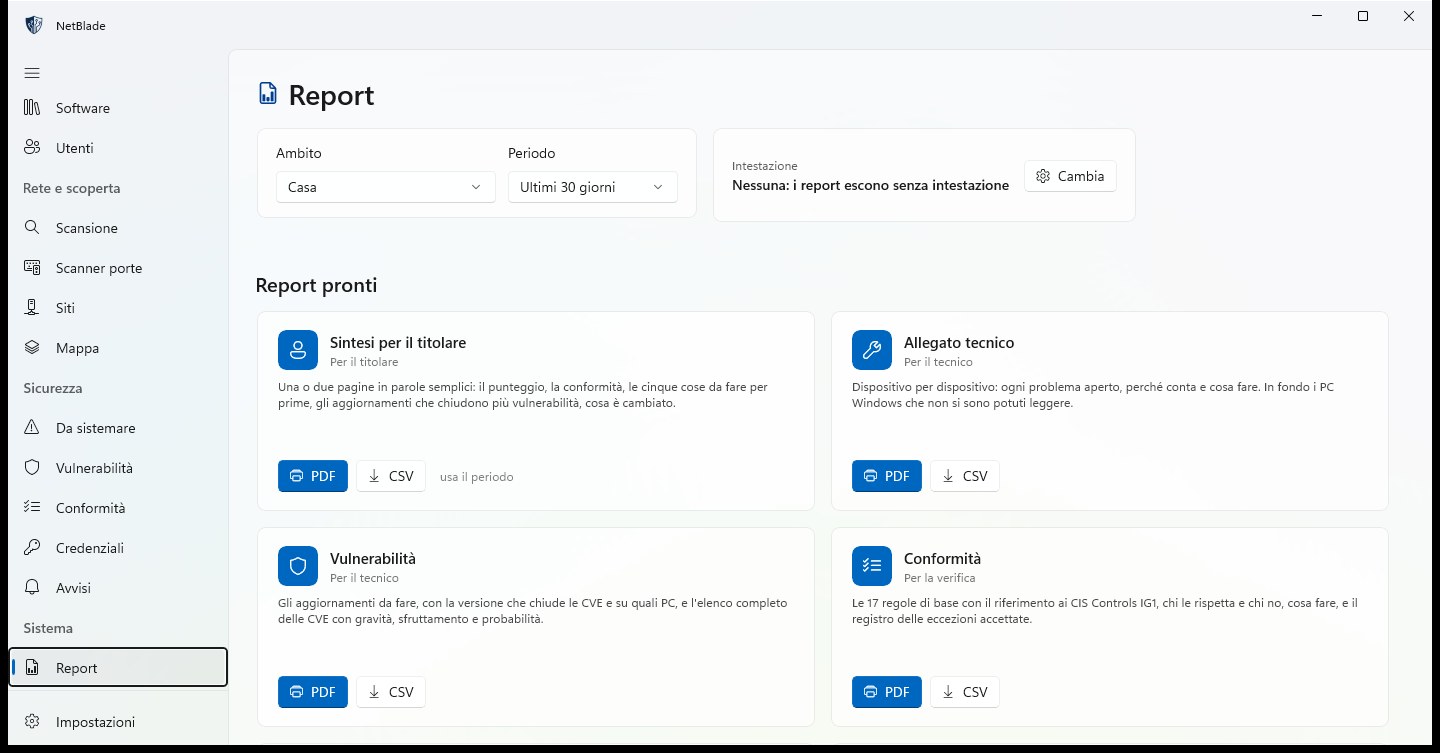
NetBlade Windows — Reports: ready to hand over
08

Reports: ready to hand over

Eight ready-made reports, each in PDF and CSV, for one site or all of them, over 7, 30 or 90 days. The owner gets a summary in plain words; the technician gets the device-by-device annex and the vulnerabilities; compliance and inventories are there for the review.

  • Your logo, name and contact details in the header
  • Custom reports: a table of devices with the columns and conditions you choose
  • Scheduled sending by email, every week or every month
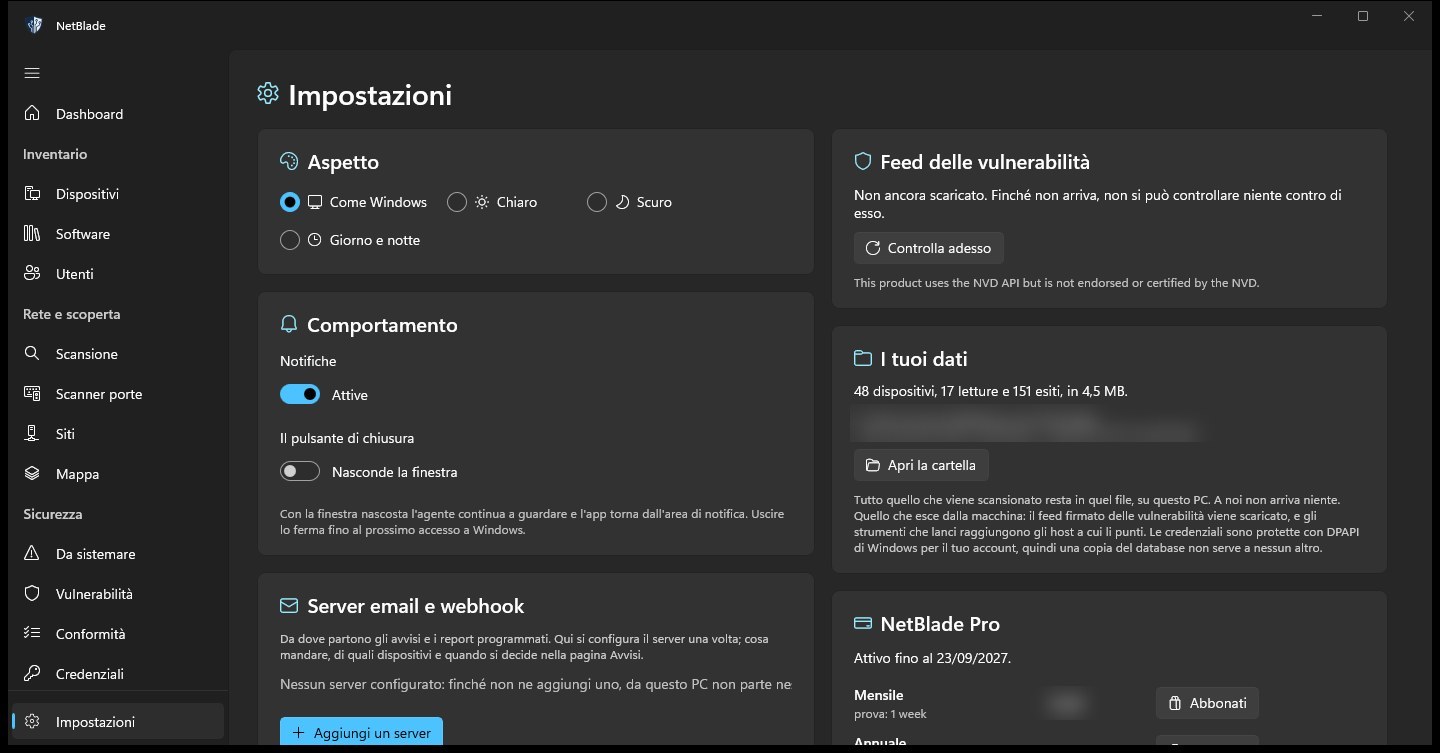
NetBlade Windows — Settings: how the app behaves, and where your data is
09

Settings: how the app behaves, and where your data is

Theme, notifications and what the close button does, set in one place: hide the window and the agent keeps working from the notification area. The same page sets up the mail servers and webhooks for alerts, shows the age of the vulnerability feed, how much data the database holds and where it is, and the state of your subscription.

  • Light, dark, as Windows, or day and night at the hours you choose
  • Credentials are encrypted with DPAPI for your Windows account
  • «Open the folder» shows the database on disk: nothing reaches us

What it does not do

  • It runs on a single PC and sees the networks that PC can reach. There is no central console and no sync between PCs.
  • The agent runs while you are signed in to Windows, not before sign-in: the Microsoft Store does not allow Windows services inside an app.
  • Automatic scans only cover the site the PC is connected to at that moment; a client's network is read from a PC on that network.
  • A program that the vulnerability dictionary cannot name gets no verdict, and there is no SYN scan and no OS fingerprinting from packets.
  • It is not a penetration test or a certification: no factory passwords tried, no exploits.

Questions about NetBlade for Windows

Can I buy it today?

Not yet: NetBlade for Windows is coming soon to the Microsoft Store. The Android app is on Google Play today, and the iPhone app is in Apple review.

Do I have to install anything on the PCs I check?

No. Windows PCs are read remotely over WMI and file sharing with an administrator account. If a firewall blocks the read, the app prepares a script to run on that PC: it opens only what is needed, only towards the PC running NetBlade, and a second script undoes it.

What happens if I stop paying?

There is no free tier: without an active subscription every section opens the subscription page and only Settings stays open, and the agent stops. Nothing is deleted: your data stays on the PC and comes back when you subscribe again. Uninstalling the app, on the other hand, deletes it.

Can I look after several clients with one copy?

Yes: each network becomes a site with its own devices, credentials and reports. The PC must be connected to a network to scan it, and automatic scans only run on the site it is connected to at that moment.

Does any of my data leave the PC?

Scans, devices and credentials stay in a database on that PC, and passwords are encrypted with DPAPI. The app downloads a signed vulnerability feed every day and compares programs locally. Everything else goes out only when you ask: a tool you run, the speed test, the emails and webhooks you set up.

Is it the same app as NetBlade for Android or iPhone?

No. The three apps are independent products: they do not sync and share no data, and each purchase or subscription is valid only on its own store. A NetBlade Pro subscription on iPhone does not unlock Windows, and the other way round.

Which Windows versions does it need?

Windows 10 version 2004 or later, or Windows 11, on a desktop or laptop connected to the network you want to look at, and a Microsoft account to subscribe.